Your home design page knows what the buyer wants. Does your sales team?
Written by Hoome - Editor
A buyer with a 12.5-metre-wide block spends half an hour on your website one evening. They filter your range down to designs that fit their frontage, compare two four-bedroom plans, and study the floorplans and facades. Then they check the nearest display home and submit an enquiry about the design they prefer.
Two days later a consultant calls them. The lead record says a name, a phone number, and “Interested in building”.
Everything the buyer worked out on the design page has gone missing between the browser and the first conversation. The consultant starts with the basics: what size is your block, how many bedrooms, have you seen anything you like. The buyer answers questions the website already answered, and the call feels like starting again.
Websites don’t automatically know or keep all of this, and not every click should follow a buyer around. But it’s easy for a website project to focus on helping buyers find a suitable design, without giving the same attention to what happens when that enquiry reaches the sales team. By the time someone enquires, they’ve already given you useful information about what they’re looking for. The question is whether that information reaches the consultant.
What buyers need from a home design page
Go back to the buyer with the 12.5-metre block. Whether your design page earns their enquiry comes down to four things. For this article, we reviewed these four areas across three established Melbourne builder websites, walking from the design listing to the enquiry form.
The first is whether a design fits. One national builder lists more than a hundred Melbourne designs, lets buyers filter them by block width, and prints the minimum width on the design cards, so a buyer with a 12.5-metre block can build a shortlist in minutes. Width alone doesn’t establish that a design can be built on a particular block, since siting, setbacks, easements, and estate rules all play a part, but it narrows the range to designs worth a closer look.
The second is the layout: floorplans at each size, and the facade options. The third is what the price covers. Another builder publishes starting prices with a footnote naming the facade and floorplan those prices are based on, giving buyers a clearer starting point for understanding the advertised price and what’s being shown, although full inclusions and site-specific costs may still need clarification. The fourth is the next step, usually the nearest display home or the enquiry itself.
Across the three sites, we found useful tools for exploring and comparing designs. The enquiry experiences were more varied, particularly in how much of the buyer’s selected information was visible at the point of contact.
How the website and sales team should share context
Between them, the three sites offer filter bars that stay pinned while you scroll, side-by-side compare trays, floorplan options you can customise, and brochures to download. But once the buyer reaches the enquiry form, some of those choices are no longer visible. Whether that information is passed through behind the scenes is something we can’t establish from a public website review.
On one site, the enquiry form named the design in its heading and asked two structured questions a consultant would actually use: where the buyer is building, and whether they have land yet. In another, the form restated the design name and asked whether the buyer was building new or rebuilding, but the only location it asked about was which display centre the buyer would like to visit, not where their own block is. In the third, the form was attached to the design page but named only the product range, and the only real question beyond contact details was where the buyer plans to build. In each case there was nowhere visible to record the buyer’s chosen floorplan size and facade except a free-text box.
Stanley Nugroho, Hoome’s Lead Web Developer, identifies two particularly useful pieces of information to carry through: the home design a buyer was viewing, and relevant preferences they’ve selected, such as the number of bedrooms or bathrooms. That can give a consultant a much better starting point for the conversation, and both can pass automatically with the enquiry rather than relying on the buyer to type them.
Where the buyer plans to build and whether they already own land are useful details too, because both can shape the first sales conversation. That test is also the line between capturing what genuinely helps sales and tracking every interaction simply because it can be tracked. Collect what the consultant will visibly use, and be open about why you are asking. A buyer who picked a design expects that choice to be remembered. They don’t expect every scroll and comparison to be brought up on a call.
Structured fields can make that information easier for consultants to use, particularly when it needs to be filtered, routed, or reported on. That doesn’t mean longer forms are automatically worse, or that every visitor should be pushed to enquire; we looked at that balance in where builders should qualify buyers. The handover should also run both ways: consultants hear which questions buyers still arrive with, and that feedback should shape the next round of website changes.
How to tell whether it is working
You can start checking this with your existing analytics, CRM, and sales team. Here are four places to look.
First, check how many of your enquiries start on, or pass through, a home design page. If design pages are where buyers decide, they should be visible in your enquiry paths. Then pull a sample of recent enquiry records and look for the design and facade the buyer was viewing; if the answer lives only in a free-text box, or nowhere, that is the gap. Third, ask consultants what buyers still ask on the first call that the website already answers. Finally, look at where buyers abandon the enquiry form, and ask sales which fields they actually use. If sales isn’t using a field, it’s worth checking whether it still serves a purpose or is adding unnecessary friction.
A five-check scorecard
For a quicker read on your own journey, score each of these from 0 to 2, where 0 is missing or not working, 1 is partially in place, inconsistent, or needing manual effort, and 2 is working reliably and providing useful information.
- Buyers can identify a design that suits their requirements, including their block.
- Buyers can easily establish what they are enquiring about.
- The enquiry process retains the selected design and other relevant context.
- The consultant can use that context to improve the first conversation.
- Marketing and sales can assess whether the process is working.
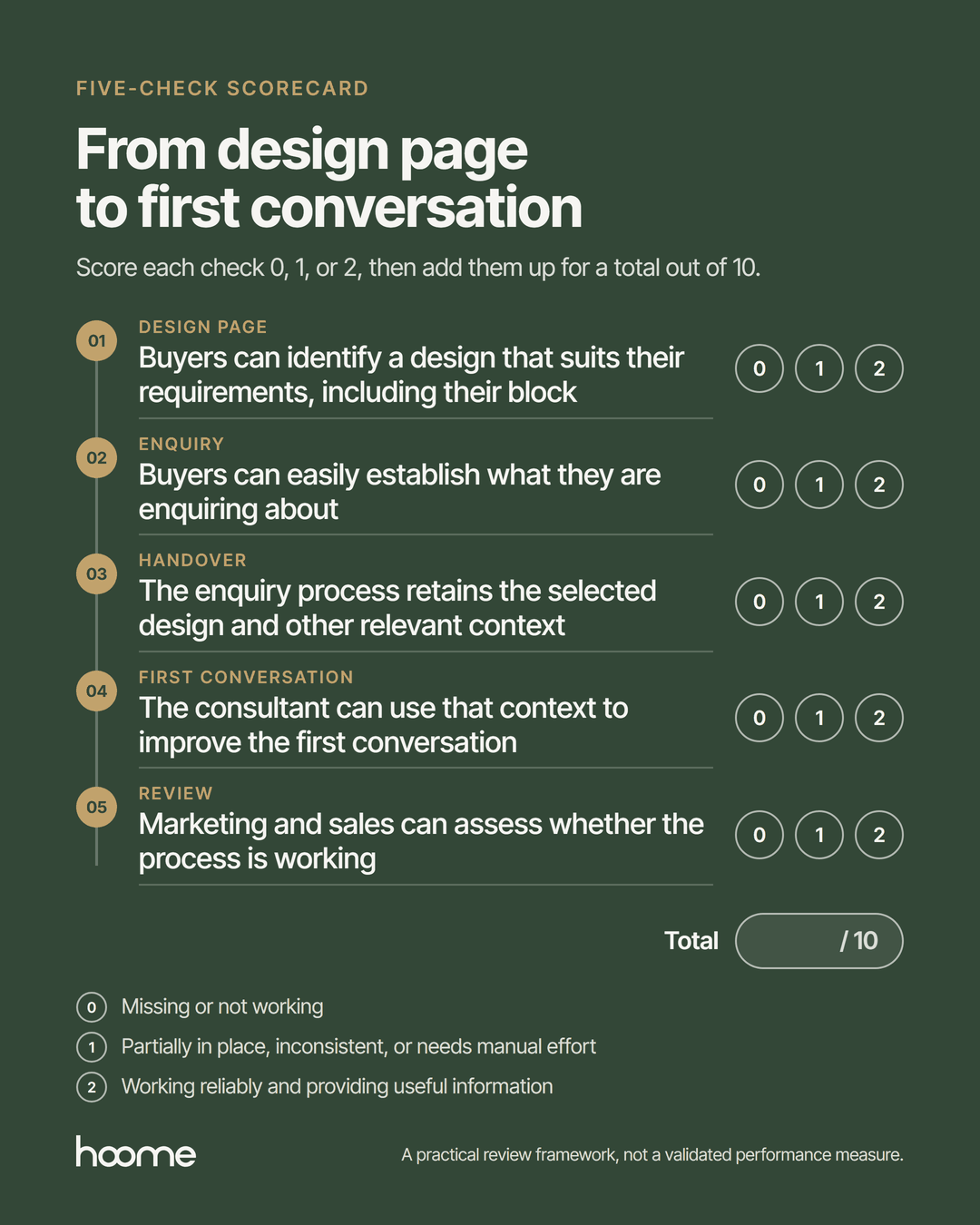
This isn’t an industry benchmark. It’s a simple way to identify which parts of the journey are working well and which might need attention.
The design page is the first sales conversation
It’s easy to judge a home design page by traffic and enquiry volume alone. It’s more useful to treat it as the first sales conversation: the place where a buyer shows you their block width, their shortlist, and their preferred design before anyone speaks to them. Carrying that context into the CRM won’t close a sale on its own, but it gives the consultant the opportunity to start from an informed conversation rather than a blank one.
So before investing in another website feature, or asking marketing to generate more enquiries, look at what your sales team receives today. Choose twenty recent home design enquiries and check whether the design and other useful information were recorded in the CRM. Then ask your consultants what additional context would have helped them have a better first conversation. You might find there’s more value in using the information buyers already provide than in adding another website feature.
Hoome works on builder websites, buyer journeys, and the CRM handovers behind them for Australian home builders. If you’re not sure what information is actually reaching your sales team, we can help you find out – get in touch today.